6. Configure roles and permissions, access tokens, and more
The Administration module centralizes all advanced platform configurations. From here you can manage users, roles, permissions, connection profiles, general settings, reports, integrations, access tokens, and more. It is the main control panel for the technical and operational administration of the system.
Each section is designed to provide full control over security, data access, and the internal behavior of Rootlenses Insight.
6.1. General settings
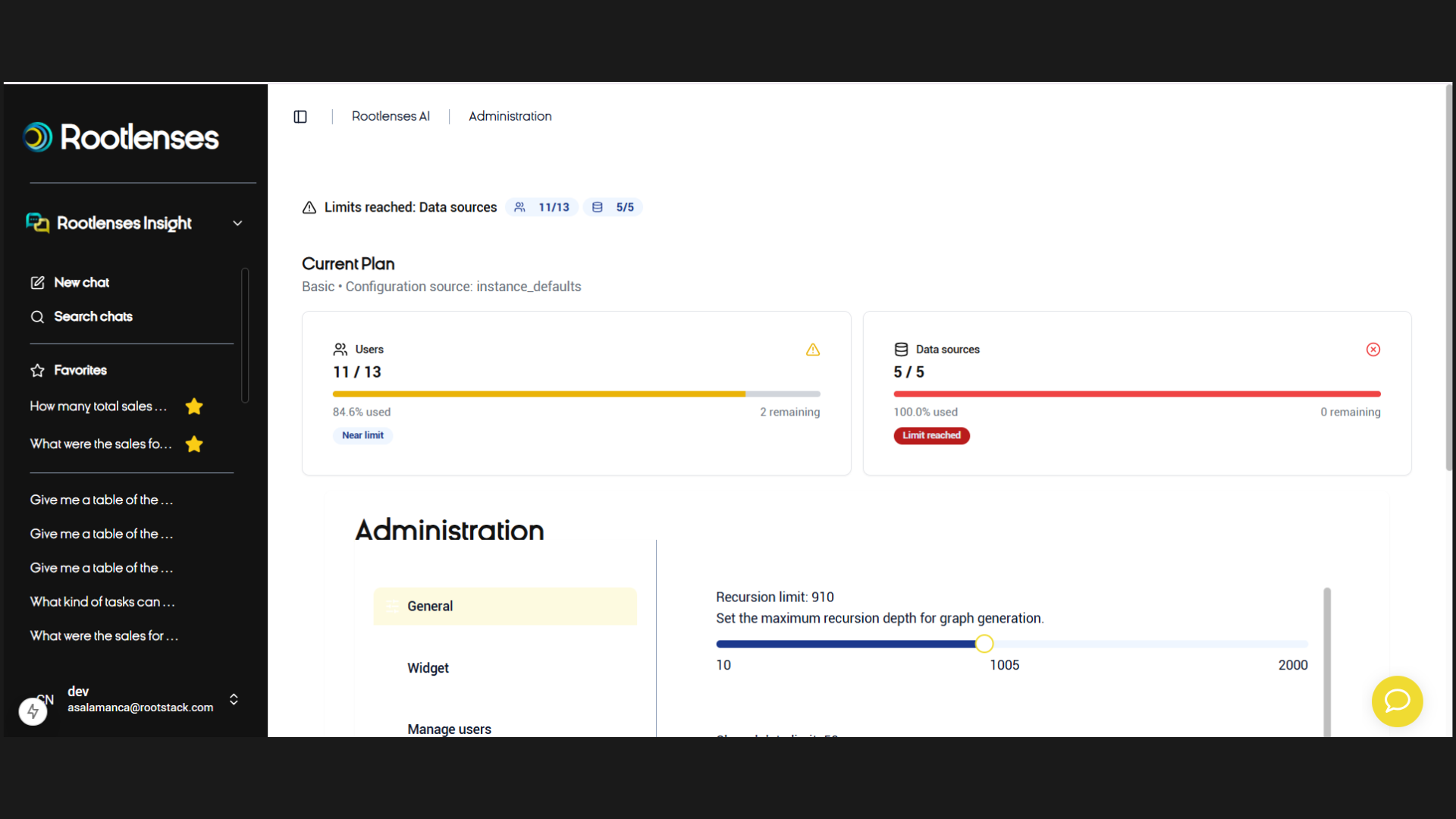
In this section, you can view the following: Current Plan
Displays:
- The subscribed plan
- The number of allowed users
- The number of available databases
- Alerts when you are nearing your limit
Example:
- 11 / 13 users → 84.6% used
- 2 / 5 databases → 40% used
This allows you to monitor capacity and anticipate when an upgrade is necessary.
Configurable limits
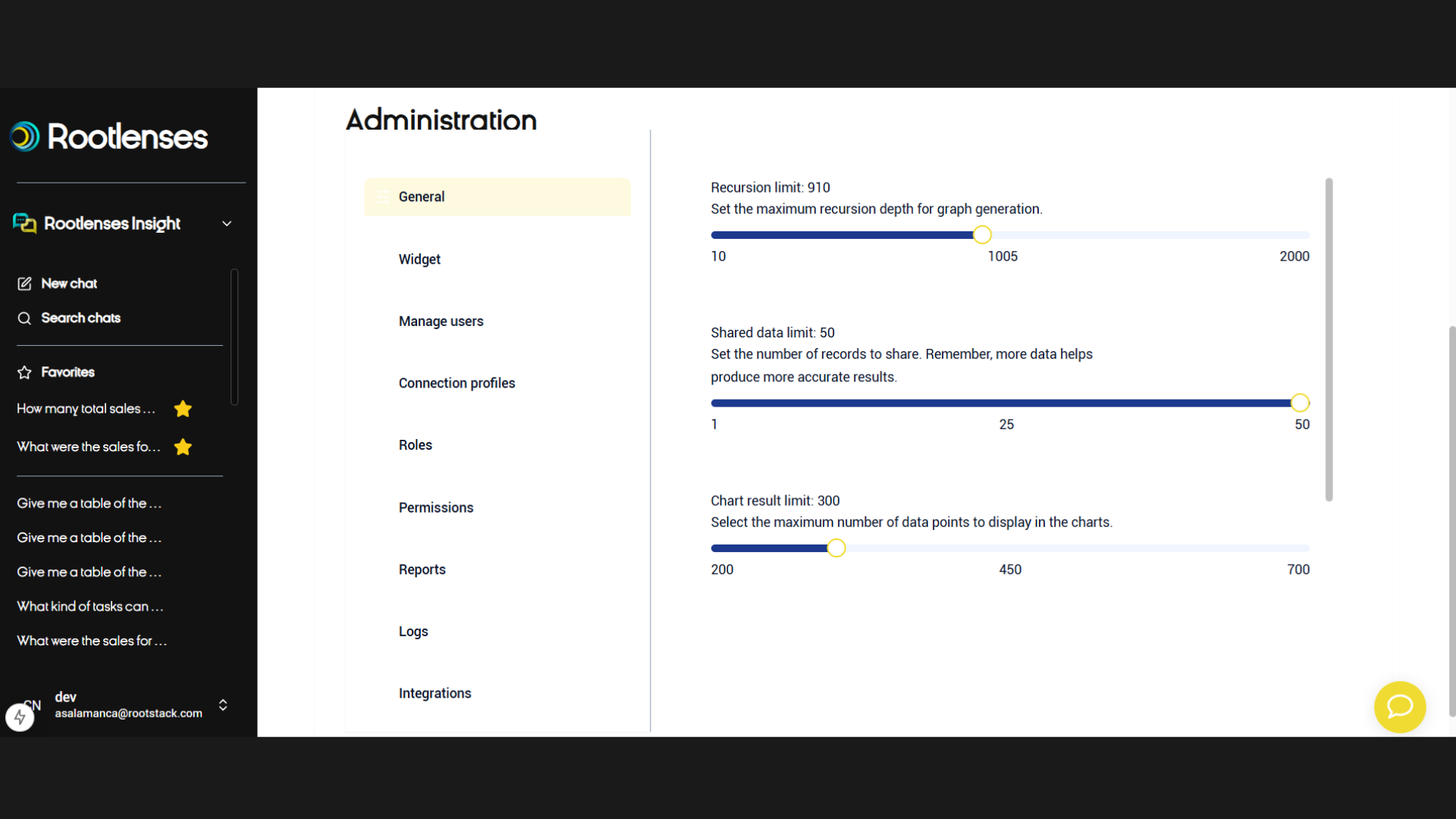
Here you can adjust technical limits according to your plan:
1. Recursion Limit
Defines how many levels the platform can explore when generating graphs or analyzing complex relationships.
Adjustable value (e.g., 10–2000).
2. Shared Data Limit
Maximum number of records that can be shared.
Example: 50 records.
3. Chart Results Limit
Sets how many data points can be displayed in a chart to maintain performance and readability.
Example: 300 records.
4. Tabulated Results Limit
Controls how many rows are shown in tables generated from queries.
Example: 5 records.
These limits help keep the platform fast, stable, and optimized.
6.2. Widget (API)
From here you can customize the widget that will be embedded via API into your applications.
Includes customization of:
Appearance
- Theme (automatic, light, or dark)
- Primary color
- Background color
- Text color
Content
- Widget title
- Subtitle
- Initial message
- Behavior settings
A Preview tab is available to see how the widget will look before implementing it.
6.3. Manage users
In this section you can:
Add new users
- View assigned roles
- Check status (active / inactive)
- See start date
- View enabled products (Chat / Voice)
- Edit or deactivate existing users
The table includes:
- ID
- Username
- Role
- Status
- Start date
- Assigned products
This is the key section for access management.
6.4. Connection profiles
Connection profiles define which tables each role or user can access.
Each profile includes:
- Linked database
- Profile name
- Allowed tables
- Denied tables
Example: A profile called Clients may allow only the tables Customers, Orders, and Customer_Demographics.
This ensures high security control and segmented access to information.
6.5. Roles
Here you can create and manage custom roles for your organization.
Each role may include:
- A name
- A description
- Associated connection profiles (Base, Clients, etc.)
Roles define what actions each user can perform inside the platform.
6.6. Permissions
The Permissions Matrix allows you to enable or disable permissions for each role.
You can control actions such as:
- Adding users
- Creating connection profiles
- Starting conversations
- Adding databases
- Creating models
- Accessing advanced options
Each permission can be toggled per role, giving very granular control.
6.7. Reports
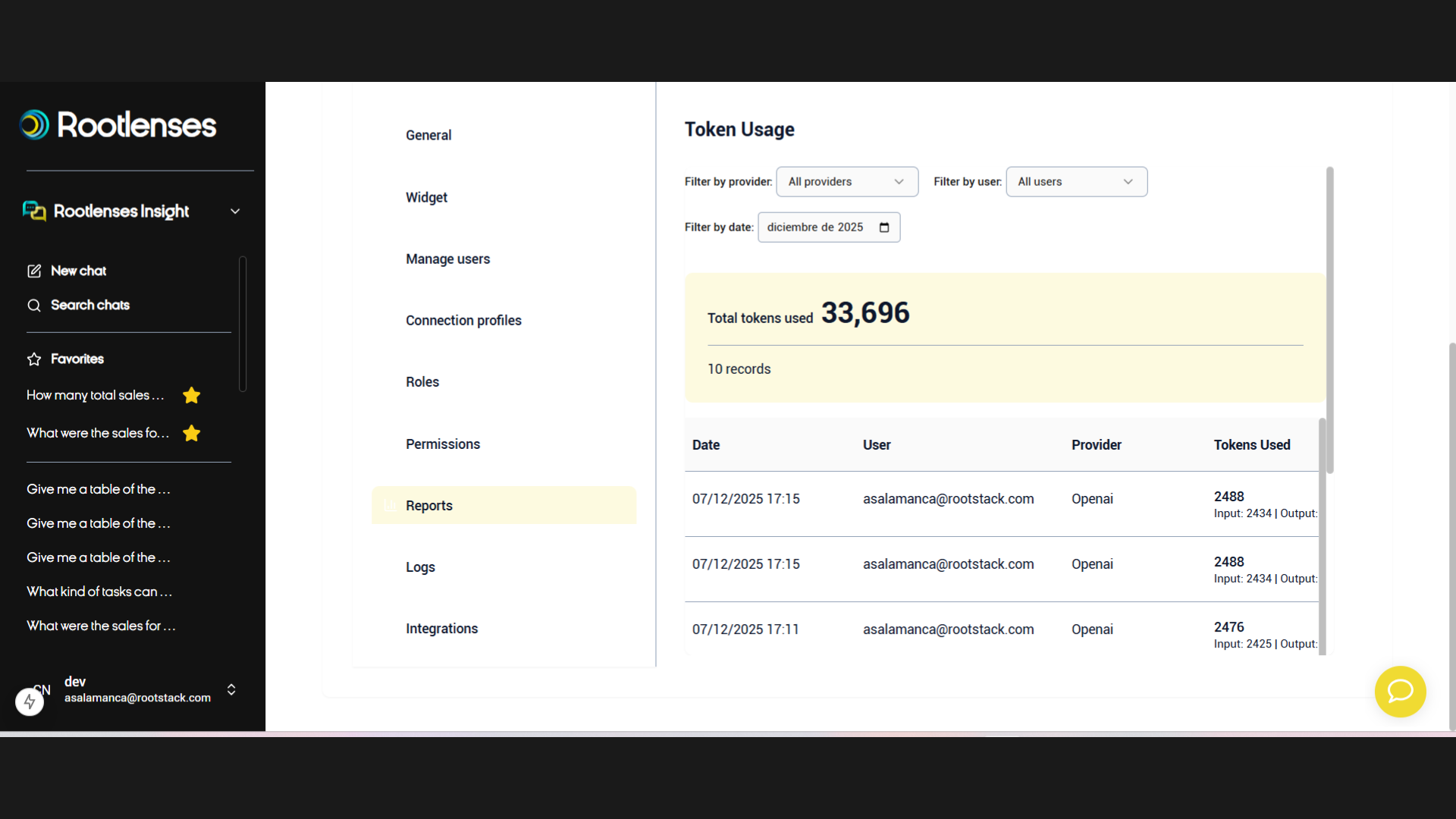
The Reports section allows you to view:
- Total token consumption
- Tokens used per user
- Tokens by provider (OpenAI or others)
- Date filters
Ideal for cost management, auditing, and usage control.
Visible example:31 ,813 tokens used — 9 records
6.8. Logs
Here you can review a complete history of system events.
Includes:
- Date and time
- User
- Origin (Internal / API)
- Event type (Message / Error)
- Detailed message
Perfect for:
- Diagnosing errors
- Viewing failed connections
- Auditing user activity
- Checking API-generated messages
6.9. Integrations
In this section you can manage your API Keys and external integrations.
You can:
- Create new API Keys
- Revoke an existing key
- View creation date
- View status (Active / Revoked)
Each integration includes a clear, identifiable name for easy administration.
6.10. Summary of the Administration section
The Administration module provides:
- Full control over users, roles, and permissions
- Monitoring of plan consumption
- Management of databases and connection profiles
- Widget customization via API
- Complete auditing through logs and reports
- Secure integration with external systems
It is the central hub for everything related to security, configuration, and data governance within Rootlenses Insight.
Usage limits in Rootlenses Insight
Rootlenses Insight adapts its capabilities based on the active plan for each account. This ensures stable performance, responsible resource usage, and a balanced experience for the entire team.
From General Settings, you can see:
- Your current consumption
- The limits assigned to your plan
- Which resources are still available
Below is a description of each limit:
1. User limit
Indicates the maximum number of users allowed in your Rootlenses Insight account.
- Each plan defines a specific number of active users.
- If the limit is reached, you must free up a slot or upgrade your plan.
2. Database limit
Defines how many databases you can connect simultaneously.
The system displays:
- How many connections you are using
- How many are still available
Example: If your plan includes 5 databases and you have 2 connected, you have 3 remaining.
3. Recursion limit
Defines how deep the platform can explore when analyzing:
- Table relationships
- Dependencies
- Graphs or complex structures
Its purpose is to prevent overly large queries that may impact performance.
4. Chart result limit
Specifies the maximum number of records that can be included in a visualization.
This ensures:
- Fast chart rendering
- Clear results
- Easy-to-interpret visuals
If the results exceed this limit, the platform will ask you to refine or filter your query.
5. Shared data limit
Sets the maximum number of records that can be exported or shared from a result.
Note: More data can provide deeper analysis, but this limit ensures speed and stability during export operations.